Help
Frequently asked questions
Answers to what game masters and their players ask most: how it works, privacy, online play, AI, plans and payment, account.
Getting started
Who is Chronicarium for?
Game masters who want to centralise their preparation (NPCs, places, quests, documents) and reveal part of it to their players during the game. Players find their character, journal, inventory and whatever the GM showed them.
Does it work with my game system (D&D, Pathfinder, Call of Cthulhu, homebrew…)?
Yes. The tool assumes no system: no imposed stats or character sheet, but texts, images and links. The fight tracker handles initiative, hit points and free notes, with no built-in rules.
Where do I start if I have prepared nothing?
Create a lore with three lines of presentation, a starting place, two NPCs and a three-part quest. That is enough for a first evening: the rest grows session after session. Follow the GM tutorial.
What is the difference between a lore and a campaign?
The lore is your world (NPCs, places, quests…), the campaign is a group of players playing in it. One lore can serve several campaigns, for instance two tables in the same world, and what is revealed in one is not revealed in the other.
Must I create a lore before the campaign?
No: if you have none, one is created with your first campaign. You can also create a lore first in My lores, then add campaigns to it.
Preparing your lore
What is the difference between "description" and "GM notes"?
The description is what players read once the sheet is revealed. The GM notes are read by you only. Put secrets, hidden motivations and roleplaying advice there.
How do I organise my places?
Places form a tree: a place can contain others (kingdom > town > district > tavern). Simply pick the "parent place" when creating a sheet. Each place can have short texts (history, rumours, point of interest) that you reveal one by one.
What are factions and reputations for?
A faction is a group in the world: order, guild, cult, people. NPCs, characters and places can belong to it. In Reputations, you note from −10 to +10 what each faction thinks of the party or of a character; players see the factions you revealed to them.
Can I link NPCs to each other?
Yes, with relations (mentor, rival, brother…). Relation types are managed in the "Lists" section of the lore menu, along with professions.
What is an “ambiance”?
A reusable sound-and-picture setting (swamp, mountain, dungeon), with images and, if you want, a background sound: Ambiances menu of the lore. Chosen for a fight, it sets the scene and starts the sound; linked to a map (in the map's form), it puts the ambiance's picture behind the map on the table's screen and plays its sound when the map is shown there.
Can I format my texts?
Yes, text areas allow simple formatting (paragraphs, bold, lists…). Unsafe HTML is removed automatically.
Scenarios
What is a scenario?
Lore quests arranged in the order they are played, with the maps linked to their parts. It is prepared once, in the lore's Scenarios menu, and works as a template: every campaign that receives it gets its own copy. See the "Prepare a scenario" step of the tutorial.
How do I link maps to a quest?
In the form of a quest part, Maps section: tick the lore maps useful at that moment of the story. They then show on the quest page (for you only) and follow the quest when it is copied into a campaign. Players never see these links.
How do I create a campaign from a scenario?
In New campaign, choose the lore: a Scenario menu appears if it has any. The quests are copied in order and so are their maps, hidden from players until you show them.
Can I add a scenario to a campaign already under way?
Yes, any time: the campaign's Quests page, Bring in a scenario block. Its quests and maps are added after what the campaign already holds. A quest that is already there is kept as it is, with its revelations and linked sessions, and nothing is copied twice; you can even bring several scenarios into the same campaign.
If I change a scenario or a quest, do my campaigns change?
No. A campaign plays its own copy, as with quests and maps: changing the scenario, quest or map of the lore afterwards does not alter campaigns already created. Deleting a scenario deletes nothing in the campaigns that received it. To get quests added to the scenario later, use Bring in again: only what is new is copied.
Do players see the scenario?
No. A scenario is for the game master only: it lists what is not revealed yet. Players only see the quests and maps you have revealed to them, as usual.
My maps were not copied with the scenario.
Maps are part of the game master's plan. Without the maps feature, quests are copied but maps are not, and a message tells you so. Once it is available, use Bring the rest on the campaign overview (or Bring in on the Quests page): the missing maps are copied and attached to the parts.
Players and privacy
How do I invite someone who has no account?
Invitations go to an existing account, by exact e-mail or username. First ask the person to sign up (their player profile is created with the account), then invite them. They receive an invitation e-mail.
Why can I not search for a player in a list?
It is a privacy choice: profiles are private and only visible to people who share a campaign. You need the exact e-mail or username.
Can players see my GM notes or secrets?
No. GM notes and anything not revealed are not sent to players: the restriction is enforced by the server, not just hidden on screen. The same goes for map fog and hidden combatants.
How do I show something to a single player?
Reveal the sheet choosing Chosen players and tick the person. For an image or a document you can also pick the audience when sending. For a message, use Messages.
I revealed something by mistake. What now?
Reopen the sheet in the campaign and set it back to Secret: it disappears from players at once. If one of them already read it, it obviously cannot be erased from their memory.
Can I bring a character from an older campaign?
Yes, if you have no character in the new campaign yet: Characters page, Import an old character button. The list shows your characters of other campaigns. The import makes a copy: its name, background, portrait, other images and character sheet. You can then adapt it without touching the original.
Not brought along: factions, reputations, relations with NPCs, inventory, journal and the game master's notes, since the new campaign may be played in another lore. Only your own characters are offered, and the game master cannot import on your behalf.
Can players edit the content?
They manage their character, journal and inventory, and can complete the events they see. The lore and your preparation stay yours.
Around the table
How do I set a session date with everyone?
In Availability, propose several slots: each player ticks the ones that suit them. When you keep a date, it becomes the session's and players get an e-mail with links to add it to their calendar. The calendar file link is public: anyone holding it can read the attendee list, so do not share it outside the table.
How does the cast screen work?
Open /cast on the TV or a second screen: a six-letter code appears. In the Interaction button > Cast screen, type it. The screen only receives what you send it: it sees none of your private data. You can unpair it at any time.
Can we play online, remotely?
Yes for what happens on the site: dice, images, ambiance, timer, fights and maps show live on each player's device. Voice and video are not provided: use the videoconferencing tool of your choice alongside.
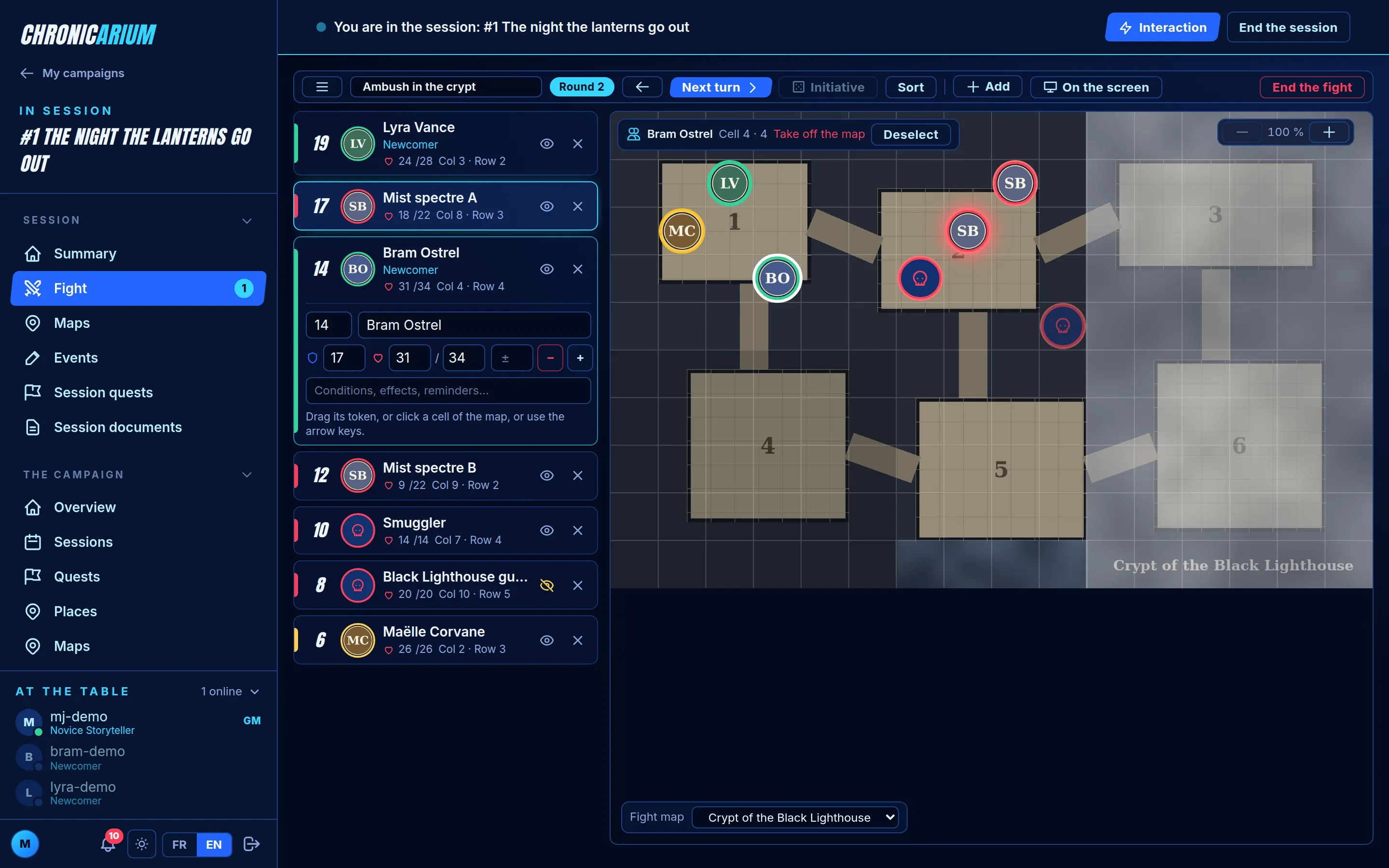
How do I run a fight?
Start the session, then open Fight in its menu (or the Interaction button). Add bestiary creatures, NPCs and the characters present, enter initiatives (players enter their own), then go turn by turn. Creatures arrive hidden by default: you choose when they appear to players. Players' titles show in the list. Click a combatant to unfold its form under it (compact fields); the ✕ next to the eye removes it from the fight.
On a map, the fight works like the map screen: thin action bar, combatant list, full-width map. Tokens can always be moved: drag them from cell to cell, or drag a character or enemy from the list onto the map. One token per cell; a monster stays invisible while its cell is under fog.
If I change a quest in my campaign, does the original change?
No. When you bring a lore quest into a campaign (from the campaign's Quests page, or by linking it to a session), the campaign gets its own copy, parts and images included. What you change, reveal or link to sessions there stays in that campaign; the lore's quest does not move and can be reused as it is in another campaign. Copies do not count toward your plan's quest limit.
How do I start a fight from a quest?
In a quest part, set the creatures and their number, then use the Start the fight button: the tracker is prepared with them.
How do maps and fog work?
Like quests, a map is prepared in the lore: upload its image, choose the grid size and prepare the cells (title, text, image, GM notes, objects, documents, NPCs, places, quests, fights). In the campaign, Use in the campaign makes a copy that you change and reveal without touching the original.
During the game, each cell stays under a fog until you reveal it. The server builds a version of the map where hidden cells are masked: the original image is never sent to players. Changing the grid size erases the cells' content (a confirmation is asked).
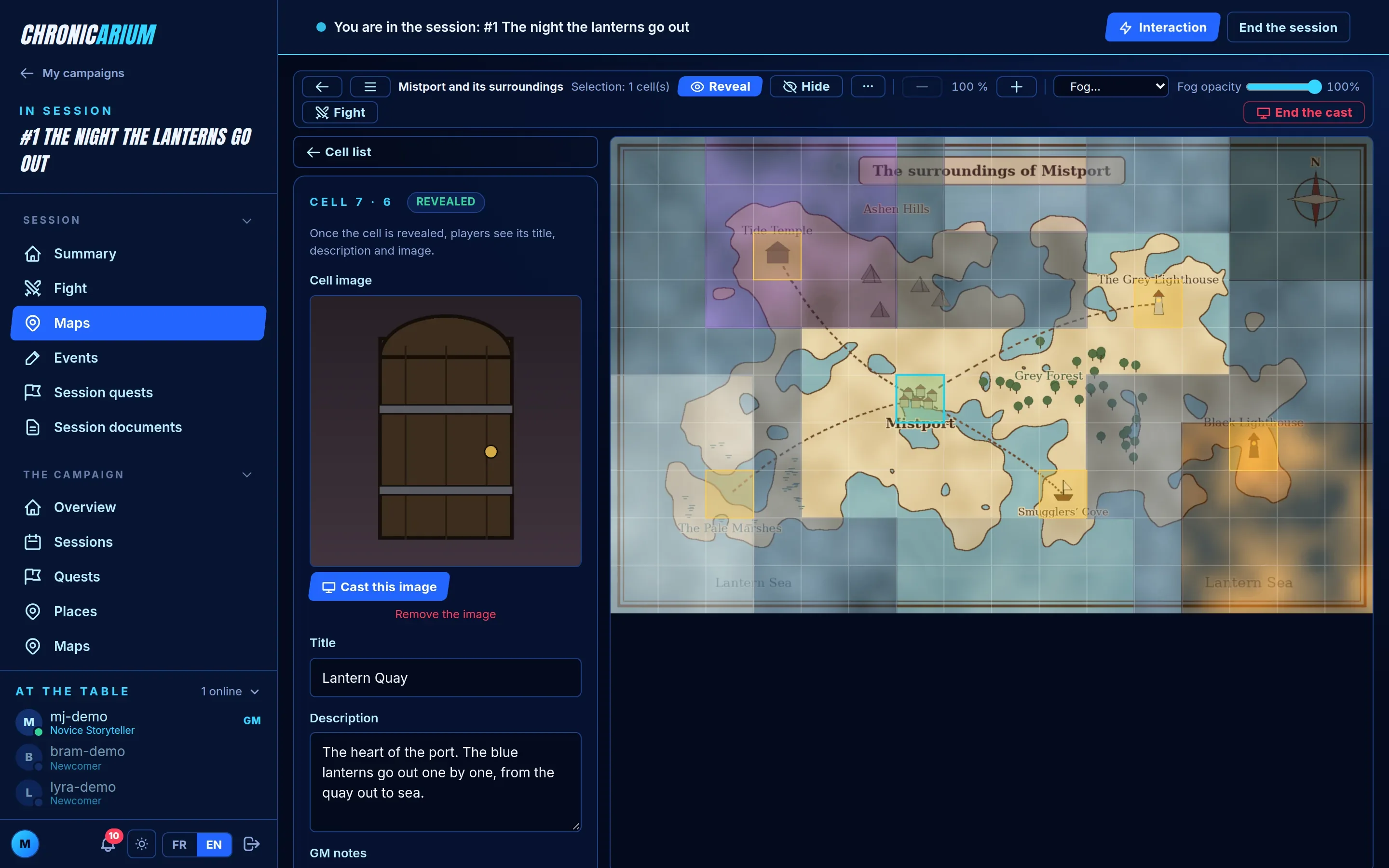
Where do I create a map: in the lore or in the campaign?
In the lore (Maps menu). From a campaign's Maps page, Create a map in the lore takes you there; once the map is ready, come back to the campaign and pick it in Use a map of the lore, then Use in the campaign. The campaign gets a single copy: asking again does not duplicate it. Maps made in a campaign before this existed stay that campaign's own.
If I change a map in my campaign, does the original change?
No, like quests. What you change, reveal or play on the copy stays in the campaign. Conversely, changing the lore's map afterwards does not change the copies already made, and deleting the original keeps them.
How do I show a map during the session?
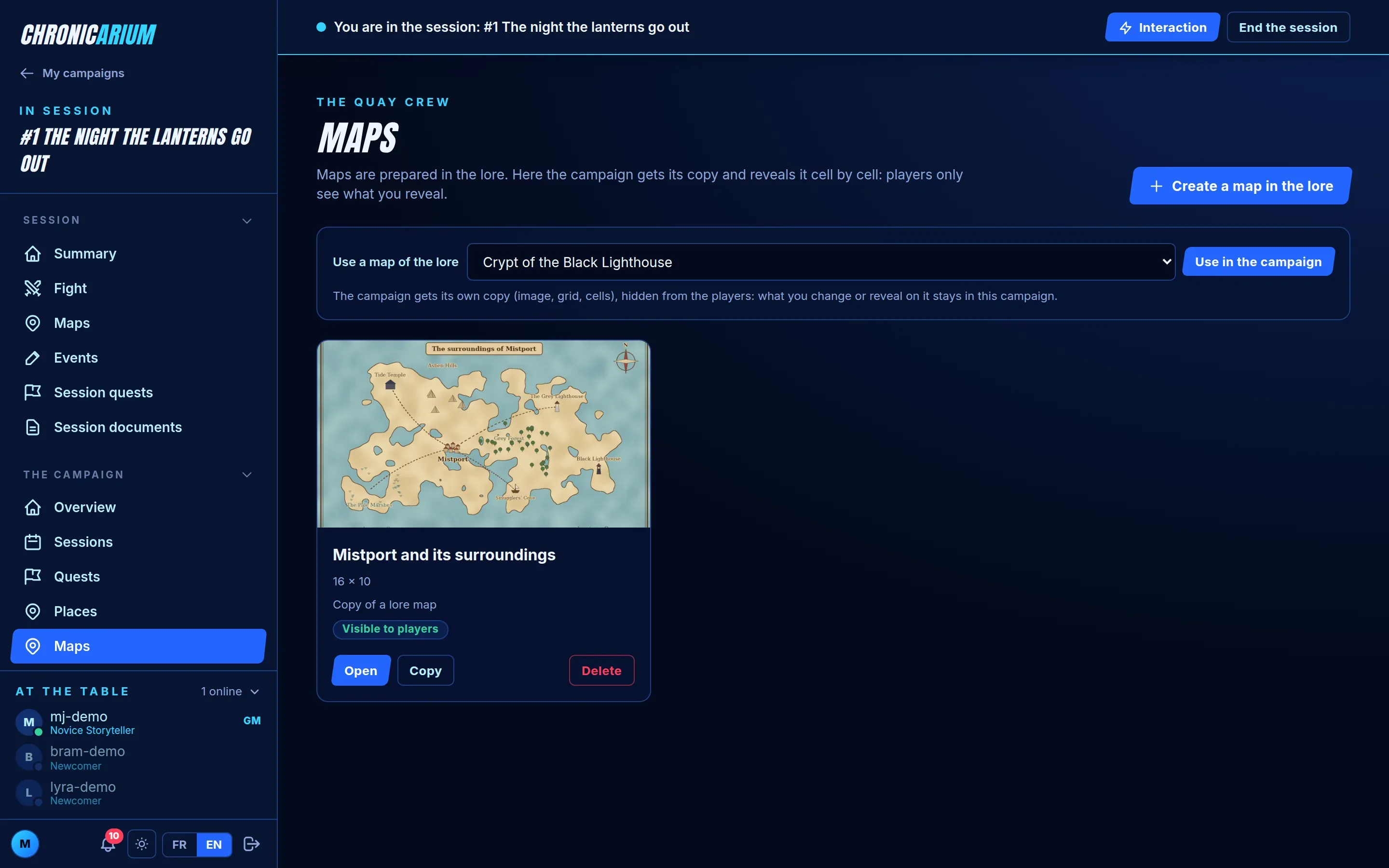
Interaction button → Map, pick it and click Show: it appears on the table's screen with its fog, and you land on the map to reveal cells as the search goes on. Tick Also on the players' devices so they see it on their phones too (revealed cells only). You can also use Show on the cast screen from the map.
As long as the map is on the screen, the page switches to table mode: a thin action bar on top (reveal, hide, zoom, fog, fight, end the cast), the cell list on the left, and the map at full width. Clicking a cell replaces the list with its form; ← Cell list or Escape goes back to the list.
Does the TV follow my zoom on the map?
Yes. Drag the map to move around and use the wheel to zoom: the table's screen frames around the same centre at the same zoom level. Its shape may differ from yours, so the visible area is only approximately the same. Whole map puts everything back to 100%. A plain click selects a cell; Shift + drag selects a rectangle, Ctrl + click adds a cell.
How do I show a cell’s image to the table?
Select the cell: its image shows at the top of the form. If the map is on the table's screen, click Cast this image: it appears large over the map, with the cell's title. Cancel removes it and the map stays on screen. Save the cell first if you just changed its image.
How do I give a map a backdrop and music?
Create an ambience in the lore's Ambiences menu (forest, tavern, cave…): add images and a background sound to it. Then, in the map's form, pick it in the Ambience field. When you show the map at the table, the cast screen displays the backdrop behind the map and the music starts; it stops when the map leaves the screen. Ambiences are also used for fights.
Can I move a character or monster on the map during a fight?
Yes, always: drag the token from cell to cell, or drag a character or enemy from the combatant list onto the map. There is one token per cell. A monster stays invisible to the table while its cell is under fog, and a character stepping forward reveals their cell. On touch screens, dragging from the list is not available yet: place the token from the map.
What are the fog types for?
For mood. Select a group of cells (Shift + drag) and choose its fog: standard, black, fire, white smoke or magic mist. The choice is made in the lore or in the campaign, and the campaign gets it with the copy. It changes nothing about what players see of the image: under every type the cell stays fully masked. Players only receive the type of hidden cells that do not have the standard fog.
The Fog opacity slider also works cell by cell (100% by default): below 100%, the image of those cells shows through the fog for players and on the screen. That is a game master's choice: at 100%, none of the image is sent to players; at 0%, the cell is visible as if it had no fog.
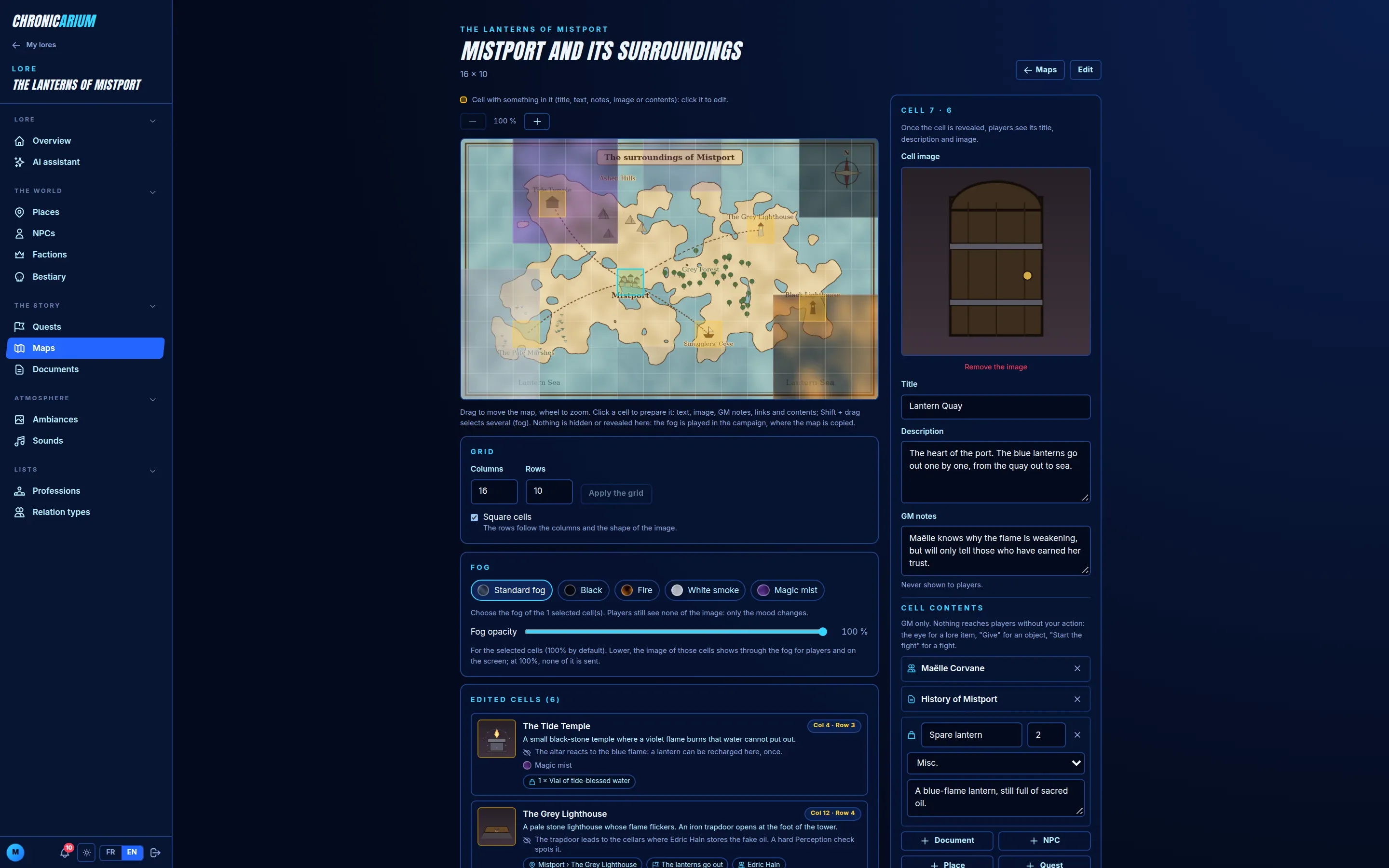
How do I know what is left to hand out on a map?
The Edited cells list shows what each cell holds. A document, NPC, place or quest linked to a cell stays hidden until you reveal it (eye icon): revealing the cell in the fog does not uncover it. Once revealed, or an object once given to the party, it is greyed and struck through in the list: what is still lit is what is left to hand out. Cells that only have a fog type are not listed.
How do I start a fight on a map?
On the map, Start a fight on this map (or Fight in table mode's bar): the fight starts with the characters present, is played on this map, the table's screen switches to the fight and you land on the tracker. If a fight is already running on another map, a confirmation warns that the tokens already placed will be removed.
Can a map be copied to another campaign?
Yes, if you run both campaigns: use the map copy from the Maps page. The simplest is still to prepare the map in the lore and use it in each campaign.
AI assistant and import
Is the AI mandatory?
No. It is entirely optional and only runs when you send a request. No image is generated: the assistant only produces text.
How do I use it?
Open AI assistant in your lore's menu: there is no key to provide. You have a monthly budget of AI credits, shown as a percentage in the assistant, which starts again on the 1st. A request uses more the more context you send and the more content you ask for; a request that fails on our side uses nothing.
How long does it take, and how am I told?
A few minutes, sometimes more with a big lore. The request runs in the background: you can close the page. A notification appears in the app when the summary is ready; if you are no longer signed in, you get an e-mail with the link.
What does the AI receive?
Your request, the expected format, and the lore items you chose as context (nothing is chosen by default), plus its professions and relation types and, if you pick a campaign, its story (sessions, events, quests). What you do not choose is not sent. This data is sent to our AI provider (Mistral) to process the request: if you do not want a text to leave the platform, untick it or do not use the assistant.
Is what the AI generates saved right away?
No. You first see a summary, can read each item's text, then tick what you keep. Everything imported is secret until you reveal it. Items that already exist are flagged and not recreated.
How do I have the sequel of a campaign quest written?
In the lore's AI assistant, tick the "Quest parts" (or "Quests") type, pick the quest in the context, then the campaign, and describe the sequel you want. The AI then receives all the sessions, their events and the quests already played, and adds the new parts after the existing quest's.
The AI answered badly or the answer is cut off. What can I do?
Ask for fewer things at once (one or two types) or remove context items to lighten what is sent. A cut answer uses credits: it is better to ask for less. If the file is truncated, retry with a shorter request. Always proofread the result: the AI can be wrong or repeat existing material.
Can I import my existing notes (Word, PDF…)?
Direct import of Word, PDF or zip documents is planned but not available yet. Meanwhile you can import a JSON file in the platform's format (the schema can be downloaded from the AI assistant), for example produced with a tool of your choice, or copy your texts sheet by sheet.
Plans, subscriptions and payment
Is it free?
Yes: a permanent free plan, with no credit card, lets you prepare a lore and run a small table. Subscriptions extend its limits and unlock the live-play tools. The limits are the game master's: an invited player pays nothing to play at your table.
What is limited?
The number of lores and campaigns you run, of players per campaign (pending invitations included), of lore items (locations, NPCs, quests, factions, creatures, documents), the storage space and the monthly AI credits budget, as well as some tools: cast screen, live interactions, interactive maps and combat maps. The exact values of your plan are in the Subscription menu.
How do I know where I stand?
A counter ("NPCs 12 / 15") shows next to the button that adds an item, and turns gold when the limit is reached. The Subscription page lists all your limits and what you use, with this month's AI budget as a percentage.
What happens when I reach a limit?
You can no longer add an item of that type; a message tells you so. Nothing is deleted or hidden, and you keep using what you have. A campaign that is over your plan's limits (too many players, too many lores or lore items, too much storage or too many campaigns) can still be played, but it cannot get a new session until it is back under the limits or your plan is raised.
How do I subscribe and pay?
In Subscription, choose a plan: payment is made on the secure page of our provider Stripe, which receives your card details; we never see them. If you have a promo code, enter it before choosing. Your subscription is active as soon as the payment is confirmed, usually within seconds.
Does the subscription renew by itself?
Yes, by tacit renewal, at each due date (monthly or yearly depending on the plan). We warn you one week, then 24 hours before by e-mail. You can cancel the renewal at any time from Subscription: you keep the plan until the end of the period already paid, then your limits go back to the free plan's. You can resume it as long as the period is not over.
What happens to my content if I cancel?
Nothing is deleted. What goes beyond the free plan's limits stays readable and playable, but you can no longer add items of that type, and a campaign over the limits cannot get a session. If you subscribe again, everything is possible again.
Can I buy extra AI credits?
Yes, in the "Credits and extras" section of Subscription. These credits add to your monthly budget: they are used after the month's, and do not reset at the end of the month.
Where do I find my invoices or change my card?
In Subscription, the "Manage my card and invoices" button opens Stripe's secure portal: your invoices, payment method and billing details can be changed there.
Can I get a refund?
Write to us from the contact form with the date and the product concerned: we look at every request. A refund stops the corresponding plan.
What if I delete my account?
Your subscriptions are stopped when the account is deleted: you will never be charged again. Payments already made are kept, with no link to you, for accounting.
Account and data
I forgot my password.
On the login screen, use "forgot password": a reset link is sent to your e-mail address.
I did not get the confirmation e-mail.
Check your spam folder, then check the address you typed. Otherwise write to us from the contact form.
Can I run one campaign and play in another?
Yes. My campaigns separates "I run" from "I play".
How do I delete my account?
Ask for it through the contact form (subject "Account"). The lores and campaigns you run as GM are deleted with the account. Detailed terms are in the privacy policy.
Is my data visible to others?
Campaigns are private: only the GM and players who accepted the invitation see them. Profiles are only visible to people who share a campaign. See the terms and the privacy policy.
What are achievements for?
They are badges that unlock as you use the app: first campaign, first session, a hundred NPCs created, a natural 20… Each group shows its completion percentage with a progress bar. They give no advantage: it is a game within the game.
How do I show a title under my name?
On the Achievements page, press Pin as title next to an unlocked badge. The title shows under your name in the campaign and in sessions. You can change or remove it at any time.
Who can see my achievements?
Only you see your list of achievements and your percentage. People who share a campaign with you only see the title you pinned.
What is the referral code for?
Every account gets a referral code, shown on My profile with a button to copy the code or a ready-to-share link. A friend who signs up with that code (or link) is linked to your account: you unlock achievements, nothing else. You only see how many accounts were created with your code, never which ones. The code is optional at sign-up; a code that does not exist is refused so that a typo is not silently lost.
Does the site use cookies or third-party services?
No advertising cookies and no audience measurement. The browser only keeps what is necessary (sign-in, theme, language, a few display preferences). Fonts are hosted on our own servers, with no call to a third-party service. The Google reCAPTCHA anti-bot service only loads when you start filling in the sign-up or contact form. Details in the privacy policy.
An achievement did not unlock although I think I earned it.
Achievements are computed from what you really created or did. Dice rolls only count at a table of at least two people, and rolls and timers only count since achievements arrived. An unlocked badge is kept even if you later delete what earned it.
Troubleshooting
Players do not see what I just revealed.
Check that you revealed it in the right campaign (the panel carries its name) and for the right players. A place's text or a quest part only shows if the place or quest is revealed too. Ask the player to refresh the page if the live connection dropped.
Sound does not start on the TV or phone.
Browsers often block sound until the page has been touched: click or tap the screen once, then start the ambiance again.
The cast screen shows "waiting".
The six-letter code has not been entered yet (or was already used). Reopen /cast to get a new code and type it in Interaction > Cast screen.
I cannot invite a player: "not found".
The e-mail or username must be exact, and the person must have an account. Their player profile is created automatically at sign-up.
The site looks wrong on my phone.
The site is meant to adapt to small screens: the left menu opens with the button at the top. If a screen overflows, reload the page and tell us which one through the contact form.
A question left unanswered?
Write to us: we reply and we complete this FAQ.